
NEWS
LATEST NEWS
- 01Stop Chasing Speed — Build a Better RC Habit
- 02AI Industry Podcast: What We Learned From 2026 Shanghai Low-Altitude Economy Expo
- 03Global market comparison between RC Car,RC Drone and RC Boat
- 04Shenzhen Drone Flight Area Control Rules | Full Guide
- 05Agricultural drone remote control | Professional Plant Protection Transmitter Guide
- 06Application of 2.4G Model Remote Controllers in the Low-Altitude Economy Sector
- 07How to calibrate drone RC controller | Full Step-by-Step Guide
- 08Drone RC Radio Controller: Ultimate Maintenance & Calibration Guide
- 09Is RC Hobby Shrinking? New User Growth & Pain Points Across Global RC Communities 2026
- 010When X9Pro version would be released based on X9S?

Address:3rd Floor,C1 Buliding,Xiangli Industry Park,Heping Haoye Road,Baoan District,Shenzhen,Guangdong,China.
Zip Code: 518103
Phone: +86 13410681808
E-mail:sale@radiocontrollers.com
NEWS
HOMENEWS
Long term storage drone RC controller | Full Maintenance Guide
2026-06-26 15:44:10 View:44Improper long-term storage is one of the top causes of drone RC controller damage, including swollen built-in batteries, unresponsive joysticks, circuit corrosion and permanent signal failure. If you don’t plan to fly for weeks or months, correct storage procedures can extend the service life of your drone RC transmitters and avoid costly maintenance or replacement.
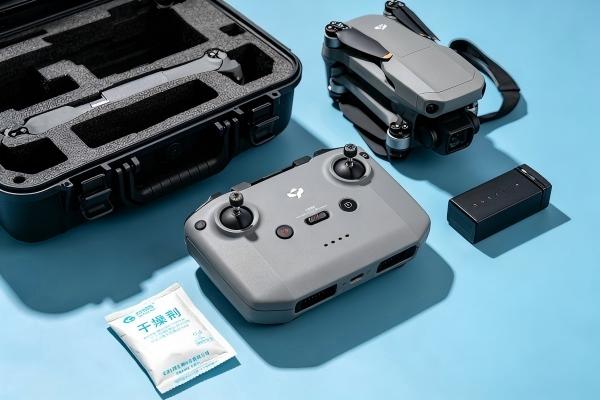
Many hobbyists and commercial drone pilots ignore storage rules, leaving controllers fully charged, exposed to humidity or extreme temperatures during downtime. Following standardized long-term storage steps protects FPV drone, RC car and RC boat remote controllers from premature aging.
Table of Contents
1. Risks of Incorrect Long-Term Storage
Storing your drone RC controller without preparation will trigger multiple irreversible issues:
• Li-ion battery swelling, leakage or capacity loss
• Humidity leads to circuit board rust and short circuit
• Dust buildup causes joystick drift and stuck buttons
• Extreme high/low temperature damages internal components
• Static erosion weakens signal transmission modules
These faults can make the controller unusable, requiring expensive part replacement.
2. Pre-Storage Preparation Checklist
Complete all these steps before putting your controller into long storage:
1. Fully power off the remote controller
2. Adjust battery charge level to storage voltage
3. Deep clean joysticks, buttons and ports
4. Remove detachable external batteries
5. Wipe off sweat, dust and liquid residue
6. Check for damage or corrosion in advance
7. Prepare moisture-proof storage bag and desiccant
3. Battery Handling for Long Storage
The built-in battery is the most fragile part during storage:
• Do NOT store fully charged (100%) or empty (0%)
• Adjust battery to 50%–60% charge for long rest
• Take out replaceable battery packs separately
• Store spare batteries in independent fireproof bag
• Avoid charging the controller before storage
4. Full Deep Cleaning Before Storage
Residual sweat and dirt will corrode parts over months of storage:
1. Blow dust from joystick gaps with air blower
2. Wipe surface with lint-free microfiber cloth
3. Clean charging port and button crevices with alcohol swabs
4. Rotate joysticks repeatedly to clear internal dirt
5. Leave the controller fully air-dried for 20 minutes
5. Standard Long-Term Storage Rules
Follow these rules for safe storage over 30+ days:
• Storage environment: cool, dry, constant temperature (10–25°C)
• Keep away from direct sunlight, heaters and windows
• Use sealed moisture-proof case with desiccant packs
• Do not stack heavy objects on top of the controller
• Take it out to recharge the battery every 2–3 months
6. Recommended Storage Accessories
| Accessory | Function |
|---|---|
| Shockproof storage case | Anti-collision and dust isolation |
| Silica gel desiccant | Absorb moisture to prevent corrosion |
| Fireproof battery bag | Safe storage for spare lithium batteries |
| Lint-free cleaning cloth | Prevent scratch during wiping |
| Air dust blower | Clear tiny dust inside joystick gaps |
7. How to Recover Controller After Long Storage
When you want to reuse the stored remote controller:
1. Take out the controller and remove desiccant
2. Charge the battery to full slowly with low current
3. Re-clean joysticks and ports again
4. Power on and test all buttons, sticks and signal
5. Complete joystick calibration to eliminate drift
6. Test bind connection with your drone/car/boat model
8. Frequently Asked Questions
How long can I store my drone RC controller safely?
Up to 6 months if you maintain 50% battery and moisture-proof environment; recharge every 3 months for longer storage.
Can I store the controller in the garage or car trunk?
No, extreme temperature swings and high humidity will damage batteries and circuit boards severely.
Is it necessary to remove the battery for long storage?
For replaceable batteries, remove and store separately; built-in batteries must stay at 50% charge level.
What if the battery swells after long storage?
Stop using immediately, dispose of it via professional lithium battery recycling points.
Where to buy durable drone RC controllers?
Visit RadioControllers.com for transmitters for drones, RC cars and RC boats.
Mastering long-term storage methods protects your drone RC controller from battery failure, corrosion and joystick drift. Proper maintenance during downtime cuts repair costs and keeps your remote control equipment stable for years of use.
RadioControllers supplies durable RC transmitters for FPV drones, RC cars and RC boats, along with storage and maintenance accessories for all remote control models.
Recommend