
NEWS
LATEST NEWS
- 01Stop Chasing Speed — Build a Better RC Habit
- 02AI Industry Podcast: What We Learned From 2026 Shanghai Low-Altitude Economy Expo
- 03Global market comparison between RC Car,RC Drone and RC Boat
- 04Shenzhen Drone Flight Area Control Rules | Full Guide
- 05Agricultural drone remote control | Professional Plant Protection Transmitter Guide
- 06Application of 2.4G Model Remote Controllers in the Low-Altitude Economy Sector
- 07How to calibrate drone RC controller | Full Step-by-Step Guide
- 08Drone RC Radio Controller: Ultimate Maintenance & Calibration Guide
- 09RC retail business tips for distributors
- 010Is RC Hobby Shrinking? New User Growth & Pain Points Across Global RC Communities 2026

Address:3rd Floor,C1 Buliding,Xiangli Industry Park,Heping Haoye Road,Baoan District,Shenzhen,Guangdong,China.
Zip Code: 518103
Phone: +86 13410681808
E-mail:sale@radiocontrollers.com
NEWS
HOMENEWS
Beginner RC Mistakes: Why Most New Pilots Ignore Radio Remote Calibration
2026-09-07 15:52:36 View:42Every new RC hobbyist spends hours picking out a cool model, charging LiPo batteries and checking receiver wiring for their RC radio remotes. Yet one simple but critical setup step is frequently skipped entirely: transmitter calibration. Many beginners jump straight into flying RC drones or driving RC cars without calibrating their sticks. This article breaks down the hidden risks of skipping calibration, explains how center drift and dead zones ruin your control experience, and shares a practical calibration workflow for new RC pilots.
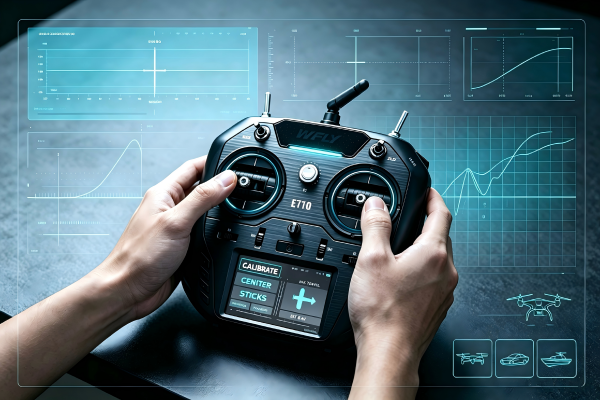
Out‑of‑the‑box factory settings do not always match every user’s gimbal tension, stick neutral point or receiver pairing status. Minor mechanical offsets inside joysticks will turn into unexpected drifting, uneven throttle response and unbalanced steering if you ignore calibration. Even brand‑new transmitters need a quick check before your first flight or run.
Table of Contents
1. What Is RC Transmitter Calibration Exactly
RC gimbal calibration is the process of letting your transmitter firmware record the physical neutral center point, full travel maximum and minimum values for every joystick axis. During the calibration routine, the system reads real‑time signal ranges from potentiometer or hall‑effect gimbals and stores these reference values.
Without this reference dataset, the flight controller or ESC cannot know where your sticks truly sit at rest. Calibration teaches your RC radio remote and model electronics what “center”, “full left”, “full right”, “maximum throttle” and “minimum throttle” mean for your specific hardware.
2. Why New RC Pilots Skip Radio Calibration
Over‑Reliance On Factory Defaults
New hobbyists assume brand‑new transmitters are 100% ready out of the box. They believe manufacturers finish all calibration work at the production line and no extra setup is needed.
Confusing Or Missing Manual Instructions
Many cheap toy‑grade transmitters never show a dedicated calibration menu. Beginners do not realize mid‑high‑end OpenTX / ELRS radios require manual user calibration.
Eagerness To Test The Model Immediately
After unpacking a new drone or RC boat, most users just want to power on and test the vehicle right away. Setup steps feel boring and time‑consuming for excited new pilots.
Lack Of Community Knowledge
Online beginner tutorials often focus on battery safety, binding receivers and PID tuning instead of basic gimbal calibration workflows.
3. Hidden Risks Of Uncalibrated RC Radio Remotes
The most noticeable problem is neutral drift. Your drone may slowly drift sideways when you release the sticks, your RC car may pull constantly to one direction without steering input, and RC boats may keep turning on still water. These unstable behaviors increase crash risks dramatically for brand‑new models.
An uncalibrated remote can also create uneven stick travel. One side of your steering might reach maximum deflection while the opposite side only moves halfway. You lose symmetrical control during racing maneuvers or precise landing operations. In the worst scenarios, incorrect calibration leads to unexpected full‑throttle surges that damage motors or crash expensive models.
4. Common Symptoms Of Poorly Calibrated Gimbals
- The model moves automatically even when joysticks are released;
- Stick response feels lopsided, one direction has shorter travel;
- Your flight controller constantly warns about stick offset in logs;
- Trim sliders need extreme adjustments just to keep the model stable;
- Hall‑effect gimbal remotes show inconsistent stick curves after physical gimbal adjustment.
5. Step‑by‑Step RC Remote Calibration Guide
First, power on your transmitter only, keep all joysticks at their natural resting neutral position before entering the calibration menu. Open the system hardware calibration page on your radio. Follow the on‑screen prompt: center sticks first, then move every stick slowly to all four corners until full travel is captured.
Save the calibration profile, power cycle the transmitter, bind the receiver again, then check stick output values on your flight controller or ESC monitor page. Confirm center values sit around the midpoint and minimum‑maximum ranges reach full scale for every axis. Test slowly on the ground before your real flight or run.
6. When Should You Re‑Calibrate Your RC Transmitter
- After you adjust gimbal spring tension or physical stick hardware;
- After a firmware upgrade for your RC radio remote;
- When you replace worn‑out potentiometer or hall‑effect gimbal assemblies;
- If you start seeing consistent center drift that trims cannot fix;
- Before an important race, competition or outdoor shooting mission.
7. How Pre‑Calibrated High‑End Radios Help New Users
Entry‑level cheap transmitters rarely provide user‑accessible calibration tools. Premium‑grade RC radio remotes include clear calibration menus, factory quality checks and hall‑effect gimbal hardware that maintains stable values longer. These professional devices reduce beginner frustration without skipping essential setup steps.
Even factory‑calibrated high‑end transmitters still benefit from a quick user recalibration after you adjust stick tension to match your hand size and control habits.
8. Frequently Asked Questions About RC Remote Calibration
Is transmitter calibration the same as setting trim values?
No. Trims are fine temporary corrections. Calibration redefines the hardware neutral point permanently. Heavy trim usage is only a band‑aid for uncalibrated joysticks.
Do hall‑effect gimbals still need manual calibration?
Yes. Contact‑less magnetic gimbals reduce wear drift, but mechanical adjustment or firmware updates still require a fresh calibration routine.
Can bad calibration permanently break my RC drone or car?
It will not burn electronics directly, but unstable control greatly increases crash risks which may damage frames, propellers and motors.
How often should a regular hobbyist run gimbal calibration?
Once after first‑time setup, recalibrate only after hardware changes, gimbal modification or firmware updates, or when obvious drift appears.
Where can I find reliable pre‑tested RC radio remotes for beginners?
rcradioremote.com offers beginner‑friendly and professional RC transmitters with clear calibration guides for drones, cars and boats.
To sum up: radio remote calibration is not an optional advanced tweak — it is basic mandatory setup for every new RC pilot. Skipping this simple step leads to unstable control, unnecessary crashes and frustrating trim adjustments. Spend 2‑3 minutes calibrating your joysticks before every new model test. This small habit builds safer, smoother and more enjoyable RC experiences for all hobbyists.
rcradioremote.com supplies professional programmable RC radio remotes and receivers for RC drones, RC cars and RC boats. Beginner‑friendly and high‑performance transmitter options are available for hobby players and global wholesale customers.
Recommend